
TUTORIAL-ADDED PIC's make your laptop a powerfull marine chart plotter
I just thought i would post this as 'davey' asked the question the other day...
Making your laptop into a marine chart plotter is easy and cheap heres the steps to getting it all setup.
1. get your hands on a software called oziexplorer. (this is the actual gps software where you can do tracks,waypoints,speed etc.)
2. get your hands on marine charts in electronic format (jpeg,bitmap,...) there are several ways to do this 1) you can scan you marine charts or any maps for that matter and then convert the jpeg,bitmap... to the oziexplore image format using the software tool. 2)you can search for any maps (marine,road, or others) on the web and convert them as above. 3) you can by electronic format marine charts from DPI (what i did)
once you have your maps, if they are not in oziexplorer format simply convert them using the tool provided. once all maps are in oziexplorer format you open oziexplorer and configure them with the lat/long coordinates which are given on the corners of any map/chart (this is very easy to do and youtube has a good tutorial on how to do this)
3. get your hands on a usb gps reciever. i got mine off ebay for $50 its water proof aswell.
plug your gps reciever to your laptop and away you go. I am currently using this setup and it is infact very acurate, and provides details of speed,waypoints,routes and much much more. it is more powerfull then a standard marine gps other then the fact a laptop is not waterproof. with this setup your laptop can be a street plotter, marine plotter....etc
Hope this information can help those intrested in pc chart plotting..
screen capture
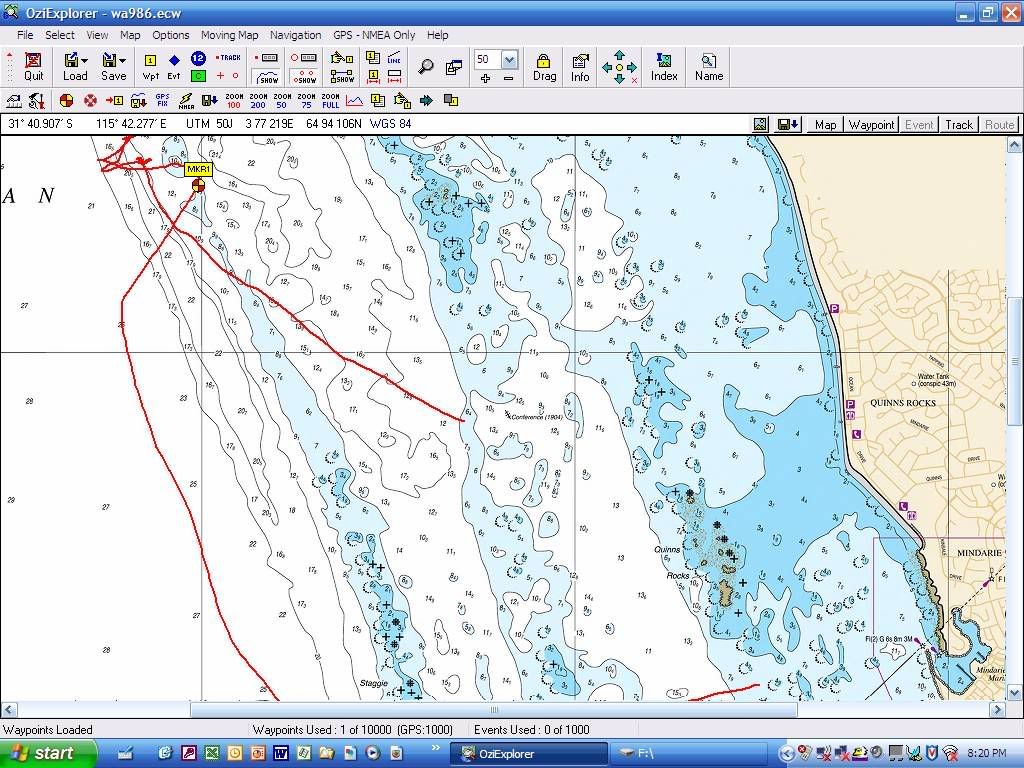
laptop,gps reciever, 12v power for laptop

Fish Hard or Go Home


Tim
Posts: 2497
Date Joined: 26/09/06
Ozi
Yep Ozi explorer works really well. Havent added marine maps to mine yet but mate has.
Ive installed mine on a Pocket Pc (palm pilot) which makes it portable and use it like a navman in the car just with more features.
Matt T
Posts: 875
Date Joined: 19/11/07
Wireless Broadband
Do you have to have the internet hooked up to recieve the GPS signal?
till
Posts: 9358
Date Joined: 21/02/08
No
No, its got nothing to do with broadband.
Colin Hay
Posts: 10407
Date Joined: 23/10/07
Good onya twofishers
Thanks for passing this info on, that's what makes this site work, members helping other members.
Moderator. Proud member of the Fishwrecked "Old Farts". Make sure your subscribed to Fishwrecked Reeltime http://fishwrecked-reeltime.com/
twofishers
Posts: 24
Date Joined: 25/05/09
hey matt as till said you
hey matt as till said you dont need broadband you just need a usb gps reciever that can be purchased on ebay, ive also added a video capture card to the laptop so that i can connect my underwater camera to it and record any footage... ill post some pics up when i get some more time (bloody uni exams...)
Fish Hard or Go Home
Pete D
Posts: 1681
Date Joined: 07/06/07
Hmmm, another
Hmmm, another project.
Cheers Pete
slothwan
Posts: 145
Date Joined: 02/02/09
Do you think one of these
Do you think one of these would handle that sort of set up?
http://www.officeworks.com.au/retail/products/Technology/Computers-and-Monitors/Notebooks-and-Laptops/INASU1122
twofishers
Posts: 24
Date Joined: 25/05/09
slothwan that laptop has a
slothwan that laptop has a linux operating system which is not compatiable with ozi, you would need to get a laptop with Windows 95/98/ME/NT4/2000/XP/Vista. a laptop of those hardware specs could handle it as oziexplorer doesnt take a lot to run. id say that you would want a pc with atleast 256mb of ram, minimium 8gb hdd (software takes up space) and you would need atleast 1 usb port for the gps reciever.
Fish Hard or Go Home
slothwan
Posts: 145
Date Joined: 02/02/09
You can load them up with XP
You can load them up with XP and a bit more ram. I have a friend who runs one like that. I thought of that one because of the solid state hard drive.
twofishers
Posts: 24
Date Joined: 25/05/09
i just did a quick search,
i just did a quick search, this laptop is overkill you could use one thats like 10 years old but if you wanted a new one something like this would do the job perfectly http://www.dse.com.au/cgi-bin/dse.storefront/4a2e157e13a4b5e22740c0a87e0106e5/Product/View/XC4251
Fish Hard or Go Home
till
Posts: 9358
Date Joined: 21/02/08
might be a good idea to
might be a good idea to consider one of those computers with a solid state disc because hard drives really don't like a lot of bumps.
fishyink
Posts: 388
Date Joined: 29/11/06
have you guys seen the
have you guys seen the joybook u101, i got one and reckon it would be awsome for this sort of application, not to big to carry around lots of room, more that fast enough, chuck some movies on it for when u get borded
twofishers
Posts: 24
Date Joined: 25/05/09
till thats something i didnt
till thats something i didnt think about and definitly worth lookin into.. so far no probs with my hdd but with newer models im not sure... I think the best laptop for this application is one thats fairly old and you dont care about because if it gets wet its all over... and buying a new laptop beats the point of this setup its ment to be CHEAP if your going to buy a new laptop i recomend just buying a marine gps thats waterproof (might not have as many features but a lot more durable for sure)
Fish Hard or Go Home
fishy fingers
Posts: 1719
Date Joined: 28/04/07
Quick charts
I recently set this up for my boat but instead of using oziexplorer I used quick charts from fremantle chart shop, it has it's own gps software and has all the DPI charts and navy charts from south australia WA and the NT, it works the same way as oziexplorer but that one only uses the dpi charts for marine use. You can buy the navy raster charts for oziexplorer but they are very expensive, and quick charts cost about $120.00 or there abouts for all of them. I bought a new Dell netbook with a 10" screen ( i got this as it has a solid state hard drive) for the job $549 + delivery, Its a cheap way to get a large screen colour chart plotter for about $800 You will also need either an inverter if your laptop dosent work on 12v dc or wire direct to your 12v switch panel. Oh and it works brilliantly!
Highlander
Posts: 151
Date Joined: 02/07/09
Very interesting reading the
Very interesting reading the above post, but it would appear, that this option would work out to nearly the same price as a good Plotter. Consider, purchase, the Lap Top,plus postage and handling. Software, USB GPS Receiver, Power Inverter,also the purchase of the required charts in electronic format, against going to a marine outlet and buying a Plotter,thats already GPS equiped and ready, splashproof then add the card.Then there is the question of warranty, will the warranty for the Lap Top, become Null and Void, if a warranty claim is made, me thinks not. I know what option I would much prefer.
Jim.
fishing, that used to be free!!!!
fishy fingers
Posts: 1719
Date Joined: 28/04/07
Read my previous post
About $800! as compared to a dedicated marine plotter probably $3000-$4000 for a 10" screen the only downside is it wouldnt be ideal for an open boat like a centre console or open tinny but so long as you have a full windscreen and canopy plus clears what are the chances of it getting wet unless it's very rough.havinbg sais that you can buy a waterproof vga monitor for about $600 still works out a lot cheaper.
Highlander
Posts: 151
Date Joined: 02/07/09
The above post, means the
The above post, means the one right above, at the very begining of the thread, it was a generalisation.
fishing, that used to be free!!!!
BQ544
Posts: 360
Date Joined: 22/10/06
what brand USB GPS antenna
what brand USB GPS antenna do you recommend?
fishy fingers
Posts: 1719
Date Joined: 28/04/07
Dosent realy matter
just look on ebay mines a waterproof one if I can remember the make of mine I'll let you know
Adam Gallash
Posts: 15665
Date Joined: 29/11/05
question
I've downloaded my gps points from a GPS 72 Garmin using easyGPS and saves as a .GPX file, I've tried converting it into a .WPT file for OZIexplorer as I have the detailed charts version and would love to see where my spots are in relation to contours. Everytime I do it, it comes up saying its a corrupted file. OZIexplorer also doesn't seem to recognise my GPS, so is there any easier way that I can get this converted?
Site Admin - Just ask if you need assistance
fishy fingers
Posts: 1719
Date Joined: 28/04/07
Should do
Oziexplorer gives you the option to download the waypoints direct from your GPS and it does give a garmin 72 as a compatible one, My gps is a garmin 176 and it worked first time when I loaded my waypoints into oziexplorer. Did you setup oziexplorer correctly and tell it yours was a garmin 72? Like I said have a look at quick charts with inbuilt charts and gps software (memory map), it's the best value for money at about $120
brenz
Posts: 2182
Date Joined: 15/06/06
i have a samsung omnia that
i have a samsung omnia that runs windows can you run it through there
fishy fingers
Posts: 1719
Date Joined: 28/04/07
Any laptop
so long as it's running windows